
It looks like a recent change to Docker has allowed Macs with Apple Silicon to run a full installation of Microsoft SQL Server 2022 with full-text search in a Docker container.
How is this possible? Docker has a new feature that can use Rosetta 2 for x64 emulation. That means it supports creating an x64-based Linux image/container and installing the free but full version of SQL Server with FTS.
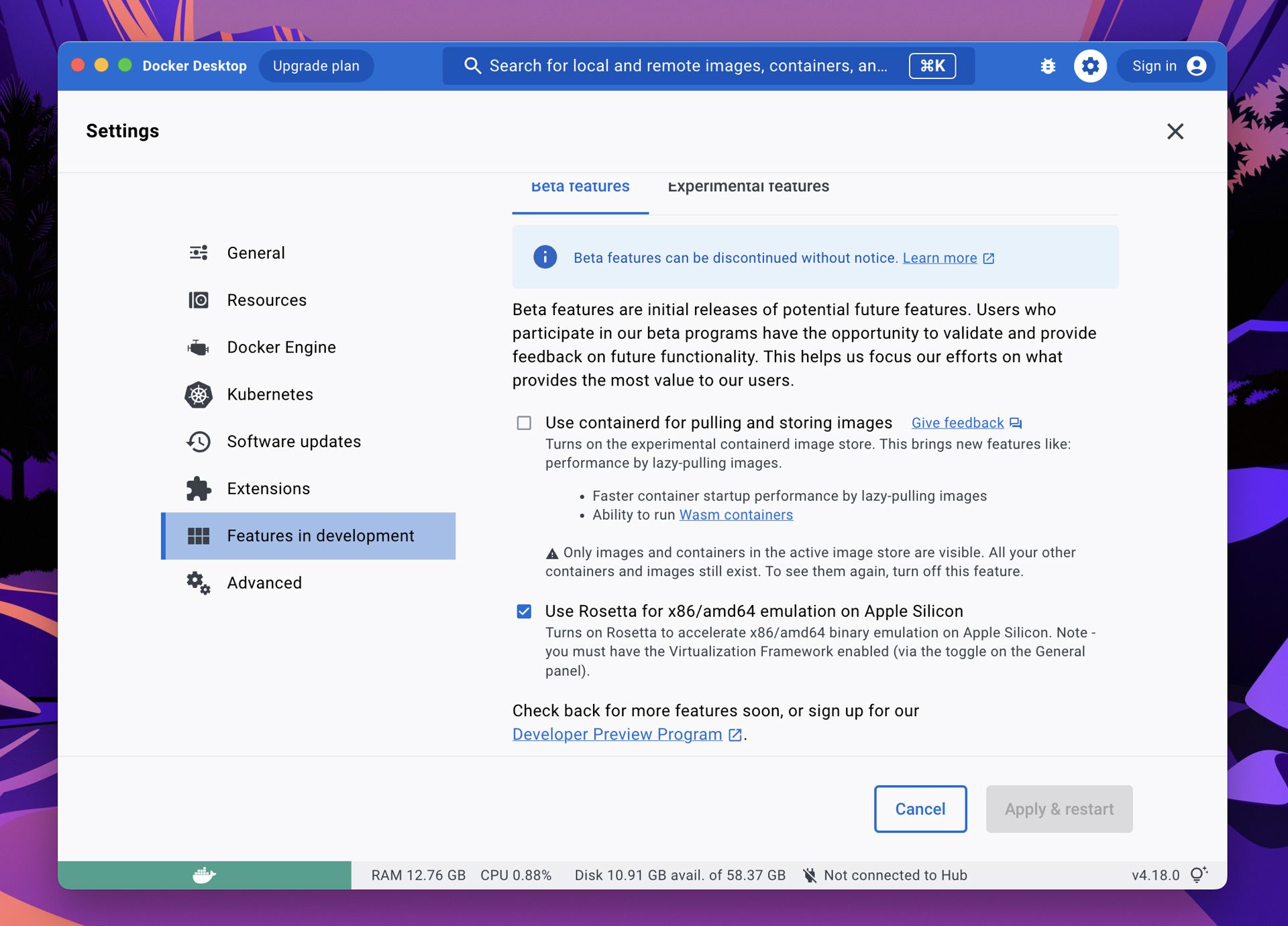
Enable this feature in the Docker settings as seen in the image below. Look in Settings => Features in development.
Take the content below and save it as a text file named Dockerfile. This configuration creates an Ubuntu 20.04 image, then installs the Microsoft package repositories, SQL Server 2022, FTS, and MS Tools.
This will build the Dockerfile and create a Docker image named sqlserver.
This will create a container from the new image and run it. The sa user will have a password of P@ssw0rdz!, the EULA will be accepted, and port 1433 will be opened.
At this point you should have SQL Server running! You can also have it start up with Docker by executing the command below:
Apple's decision to make macOS look and feel more like iOS is aspirational, certainly. If users could seamlessly switch between operating systems and retain muscle memory it would be a big win. It's no wonder that Apple decided to do this with macOS 13 Ventura.
But in practice, Apple's zeal for consolidation has created some real problems for users. In many cases it feels like one step forward and two steps back. I can see how iOS power users may welcome most of the changes to macOS, but that position smacks of Stockholm Syndrome to me.
One of the best examples of this is the redesigned System Settings, which is a mess. I've given it months to “grow on me” and it has… like a fungal infection. The settings are (dis)organized into a single column of top-level categories in a seemingly random order. Devices running macOS have wide screens, so restricting the top-level categories to a single narrow column is an artificial limitation. And it can’t be remedied by resizing the System Settings window because only its height can be changed.
And the organization? macOS has a much deeper and more broad collection of settings than iOS. So as difficult as specific iOS settings can be to find on an iPhone, it’s near impossible on a Mac. And making it worse is the fact that some settings have been organized out of existence, spread out into disparate, counterintuitive categories. Want to tune all your power and sleep settings? You may have to explore a dozen settings categories to find them when they could have been put into an “Energy” category or something similar. Luckily there is a search feature. Without it I’m sure users would be surrounding the Apple Campus with pitchforks and torches.
Also part of this convergence initiative is the Apple decision to make physical keyboards work more like the iOS virtual keyboard, which changes contextually. The difference is that the iOS keyboard changes in appearance so you can infer what's expected. This means that, for example, sometimes you can use the delete key to remove characters to the right of your cursor, and sometimes you can't. It's like an infuriating game. And now when you press and hold an alphanumeric key it no longer repeats, in favor of a popup with extended characters (e.g. foreign characters with accents and ligatures). I suppose that’s handy for people who write in a foreign language. But you would assume that it would be an option, not a change to the original default key behavior. Your keyboard isn’t broken. Apple made it better YOU'RE WELCOME.
Here's an interesting method for styling an adjacent element based on whether an <input> is empty or not.
The traditional method for accomplishing this is to use JavaScript, which involves more complex code that is difficult to write and manage. It would require using a selector to find both elements, determining if the input is empty or not, and altering the styles or class names of the adjacent element.
The method below only requires CSS.
In this case I'm hiding and showing a clickable icon that clears the search text if there is any. No JavaScript needed other than the click event 😃.
There's usually more to the story so if you have questions or comments about this post let us know!
Do you need a new software development partner for an upcoming project? We would love to work with you! From websites and mobile apps to cloud services and custom software, we can help!
When asked, most people think that software development is coding; the physical act of programming apps and platforms for servers, computers, and mobile devices. This is not the case.
Software development is the process of solving problems through software. It's a creative process that is centered on discovery and adaptation which uses tactics like programming (coding) to accomplish its ends. Likewise, software development is not the act of reusing existing software for a new purpose. That's just copying bits.
So it is important for those involved in the software development process to understand and acknowledge the following key aspects.
Understanding the problem domain is the key to a successful software development process. And we know the least about a problem domain at the outset. So it doesn't make sense to plan everything out at the beginning. Software development is an exercise in learning. We learn more and more about the problem to be solved as we move through the process. And as the problem domain comes into focus we should be refining or redefining what we should be building as we learn.
Mistakes help us solve problems and are one way in which we learn. Embrace them. Plan for them.
Perfect plans are usually perfectly wrong. It is impossible to perfectly know the steps, mistakes, discoveries, interruptions, and goals for a project, nor the time impact of each, all in advance.
Great software doesn't just manifest in one go. It springs forth in a deficient state and evolves over time. This makes guessing about its future state with any accuracy a fools errand. It also means that creating precise specifications for those guesses can be a waste of time.
Accuracy and precision are not the same. Something can be very precise but horribly wrong. This has been shown by various studies, including those in the Microsoft Press book Rapid Development by Steve McConnell. According to the book it doesn't matter how diligent or thorough an estimate may be. The data shows that when compared to a more broad, high-level, or piecemeal approach based on past experience, the error bounds are largely the same.
We must understand the level of precision that makes sense. For example, it doesn't make sense to plan an entire project with the same precision as planning next week's work. Likewise, planning specific deliverables for dates far out into the future is also problematic. Small time horizons increase the accuracy of our guesses.
By deploying changes frequently, we allow the entire team to steer the direction of the project early and often. This agile approach will ensure that the final product performs as it should for its users.
There's usually more to the story so if you have questions or comments about this post let us know!
Do you need a new software development partner for an upcoming project? We would love to work with you! From websites and mobile apps to cloud services and custom software, we can help!
 Lehigh Valley Hospital, Cedar Crest
Lehigh Valley Health Network (LVHN) is proudly part of Jefferson Health. LVHN's mission is to heal, comfort, and care for people and communities by providing advanced and compassionate health care of superior quality and value supported by education and clinical research.
Lehigh Valley Health Network (LVHN) partnered with Fynydd to build a curated, locked-down "kiosk" learning and entertainment experience for in-room patients. It would be deployed on Apple iPads and rolled out to a limited number of random patients. IT would gather analytics on usage through tracking of the patient's Internet access and in-person feedback. The goal was to try a new approach to educating patients about their care team, as well as what to expect when they go home, and a more enjoyable experience while in the hospital.
HIPAA requires that the device be completely cleared of all personal information between patients, and nurses needed a simple way to reset the devices, and keep patients from navigating into device settings, the App Store, and other areas that would create HIPAA and security concerns.
The first thing we had to do was ensure that HIPAA compliance was possible. After some research, we discovered that by using iOS "Guided Access Mode", we could keep patients in our app, even if the device was locked. We also discussed being able to write a system which would auto-wipe any browser or other history and input from the device whenever the user was taken to the "Acceptable Use Agreement" screen, asking for consent. We also created a shortcut for hospital staff to get there and a passcode so only hospital staff could initialize the app.
The app had lots of information about a patient's care team, what to expect during their stay, and what to do when they get home. They also had access to specific web resources, including a custom YouTube interface with curated LVHN videos.
During the testing phase, armatures which held the iPads were connected to the hospital beds, making it easier for patients in most any condition to use the device. There were no support calls, LVHN IT was able to get the analytics they needed, and some lucky patients got an even better experience.
Some of the key features include:

Apple iOS

Github

Swift

Amazon Web Services

ASP.NET

C#
Github

Microsoft Windows

SQL Server

YouTube
There's usually more to the story so if you have questions or comments about this post let us know!
Do you need a new software development partner for an upcoming project? We would love to work with you! From websites and mobile apps to cloud services and custom software, we can help!
We'll be presenting the following topic at the 2012 UK Semantic Tech & Business (SemTech) Conference:
Building a Semantic Enterprise Content Management System from Scratch
2012 UK Semantic Tech & Business Conference
Millennium Gloucester Hotel, London, England
Thursday, September 20, 3:45-4:15 PM
Detail on our program is available on the SemTechBiz UK 2012 site. The conference runs September 19-20. We hope to see you there!
There's usually more to the story so if you have questions or comments about this post let us know!
Do you need a new software development partner for an upcoming project? We would love to work with you! From websites and mobile apps to cloud services and custom software, we can help!
In early June, Fynydd was invited to speak at the 2012 Semantic Tech & Business Conference in San Francisco, California. By all accounts, Fynydd’s message was unique, informative, and overall very well received by conference attendees.
The topic “How To Build a Sematic Content Management System From Scratch” garnered much interest even before the conference began. During our presentation, we outlined a case study based on a recent Fynydd client engagement. We walked through the successes and challenges Fynydd faced in designing and implementing a semantic prototype system for a large financial institution.
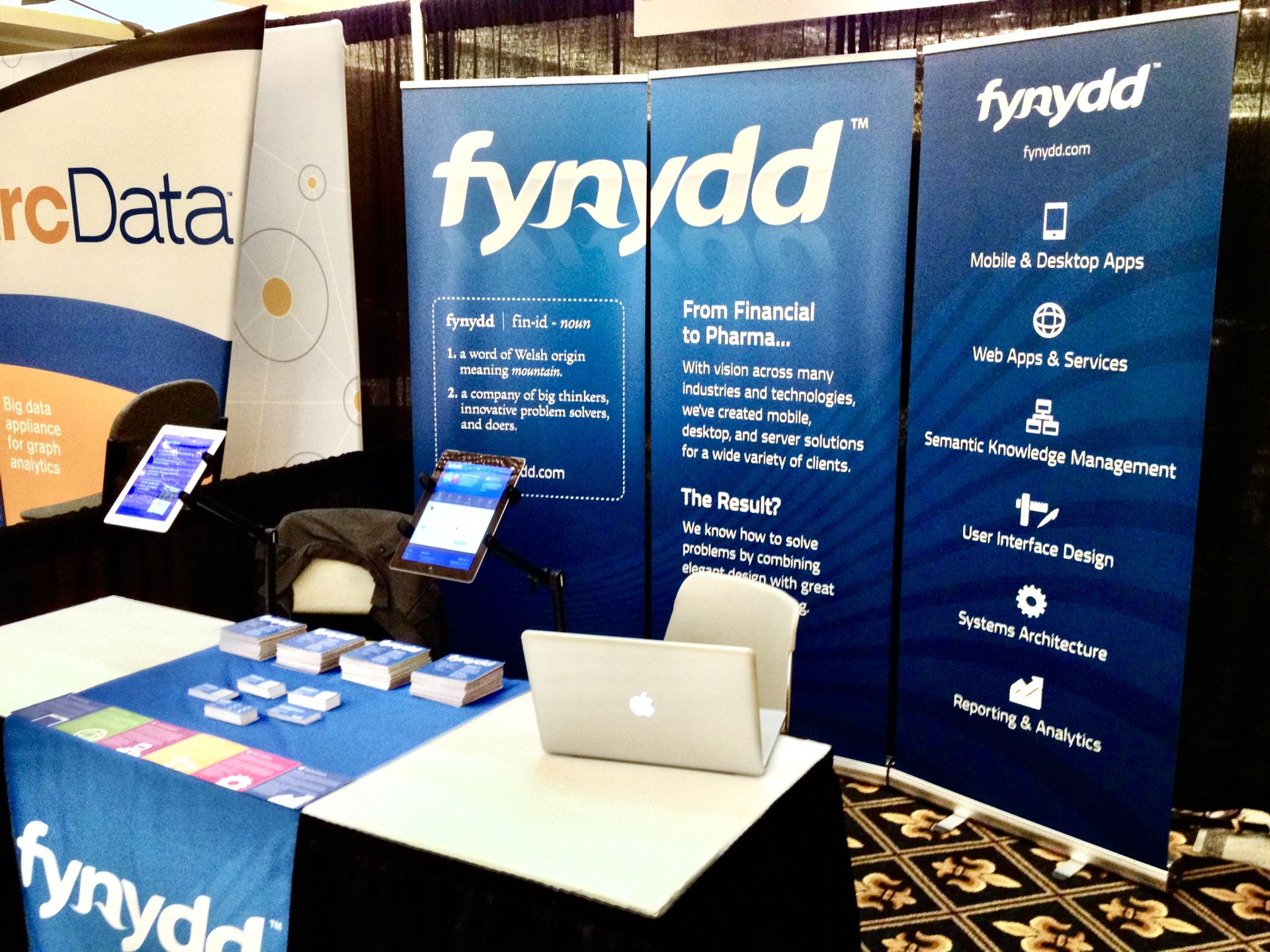
Though primarily invited as a speaker, Fynydd also secured a location on the exhibit floor of the conference so that we could present our full breadth of services to conference attendees. Activity at the exhibit was bustling. Attendees remarked about Fynydd's unique set of service offerings, as well as how we worked with other exhibitor products to build holistic solutions for our clients. Conversations focused heavily on user interface design and overall user experience as well as implementation of semantic technologies across a wide variety of industries and projects.
With the success of this conference, Fynydd was asked to present at the SemTechBiz satellite conference in London later this year. You can find out more by visiting the Fynydd SemTech page and the SemTechBiz London site.
There's usually more to the story so if you have questions or comments about this post let us know!
Do you need a new software development partner for an upcoming project? We would love to work with you! From websites and mobile apps to cloud services and custom software, we can help!


