

Software developers using Apple Silicon Macs who work with Microsoft SQL Server have been wrestling with how to build on their local computers for some time. The problem is that SQL Server only supports x64 processors, even in the latest editions. And that's just the start.
In the past, when Macs used Intel x64 chips, developers could run a SQL Server instance in several ways:
Use an x64 Windows machine on their local network (yuck)
Run a Docker container with the free version of Azure SQL Edge
Run SQL Server on an x64 Windows virtual machine using Parallels Desktop
Boot into x64 Windows using Boot Camp, and just work in Windows
When Apple Silicon was released, things got complicated. We were left with these options:
Use an x64 Windows machine on their local network (yuck)
Run a Docker container with the free version of Azure SQL Edge; uses Rosetta 2 to emulate x64
SQL Server would not run in a Parallels virtual machine because only Arm64 Windows 11 was supported, and no SQL Server editions would run through the Windows Prism emulation.
Boot Camp no longer exists
Apple recently added another wrinkle by deprecating Rosetta 2 in 2028. And Microsoft added a wrinkle by deprecating Azure SQL Edge in 2025. So we are left with one option:
Use an x64 Windows machine on their local network (yuck)
We now have a viable solution. It's not the perfect option. A perfect option would be a containerized version of SQL Server that was Arm64 native. But we do have the next best thing...
When Microsoft recently released SQL Server 2025, one of the things they added was support for running it on Arm-based Windows 11 using the Prism emulation layer. This meant that, although not officially supported, we could use an Arm-based Windows 11 virtual machine (using Parallels Desktop) to host the latest version of SQL Server, even Enterprise Edition!
There is an issue with the installation that causes SQL Server to only bind to a named pipe. This allows you to use it on the virtual machine using SSMS but nowhere else. But after much trial and error I discovered that TCP binding support is there, it's just not available in the SQL configuration tool where you would enable it. Some registry additions restore and enable the binding. Below is a simple PowerShell script that does this for you. Run this in an elevated PowerShell instance.
To make the server instance available to the host Mac, and devices on your local network, there are a couple additional steps.
First, set your Parallels virtual machine to use Shared Networking
Next, add 2 port forwards to the Shared networking model within the Parallels application preferences.
TCP port 1433 to 1433
UDP port 1434 to 1434
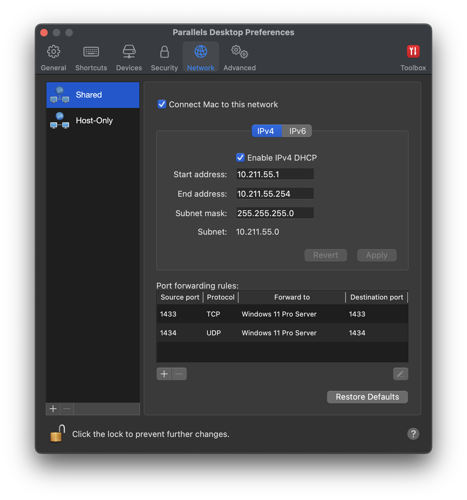
Lastly, open those two ports in the virtual machine Windows Firewall.
Once these remaining steps are complete you should be able to connect to the SQL Server instance from your host Mac, or over a network from any other device, using the host Mac's IP address. This method uses more memory than a container, but it's also better than a container because it's a native edition of SQL Server 2025 running on actual Windows. This means you get all the additional features, including the new AI and vector embeddings support, C# code compatibility, and more.
#YOUREWELCOME
There's usually more to the story so if you have questions or comments about this post let us know!
Do you need a new software development partner for an upcoming project? We would love to work with you! From websites and mobile apps to cloud services and custom software, we can help!

Vector search has been around for a long time. For example, Google has been using it since the late 1990s. This powerful, almost magical technology serves as a core component of most web and app services today, including modern AI-powered search using retrieval augmented generation (RAG). It provides a low-power way to leverage AI's natural language processing to find data with semantic context.
A vector database stores data as numerical embeddings that capture the semantic meaning of text, images, or other content, and it retrieves results by finding the closest vectors using similarity search rather than exact matches. Sounds like an AI large language model (LLM) right? This makes it great for web and app content because users can search by meaning and intent, not just keywords. So synonyms and loosely related concepts still match. It also scales efficiently which is one reason large organizations like Google have used it.
A happy side effect of how these platforms work is that they're also good at handling misspellings, to a point. To really get robust handling of spelling variations, however, two strategies tend to be common:
Spell correct the actual search text before using it
Include character n-grams in your vector database entries
Character n-grams are vector embeddings (like commonly used semantic embeddings) that break text into overlapping sequences of characters, allowing vector search systems to better match terms despite typos, inflections, or spelling variations. Without these n-grams, a misspelled query like "saracha sauce" would likely return a higher score for "hot sauce" entries. But including character n-grams, a combined (fused) search would more consistently return a higher score for items with the correct spelling "sriracha sauce".
Using these n-grams can better handle searches with:
typos
missing letters
swapped letters
phonetic-ish variants
common misspellings
How does this work? At a high level, it adds a character match capability to the standard semantic search used by most vector database implementations. Here's a quick example of what happens under the hood. Take the first word in our previous example:
sriracha
3-grams: sri, rir, ira, rac, ach, cha
4-grams: srir, rira, irac, rach, acha
saracha
3-grams: sar, ara, rac, ach, cha
4-grams: sara, arac, rach, acha
Shared grams:
shared 3-grams: rac, ach, cha
shared 4-grams: rach, acha
So even though the beginning is wrong (sri vs sa), the ending chunks that carry a lot of the distinctive shape of "sriracha" survive (racha, acha, cha). And since the second word is the same, they have even more matching grams.
When these matches are fused with semantic matches, it adds weight to the correctly spelled "sriracha sauce" entry, yielding a better match set.
When it comes to including character n-grams, there are only a couple changes you need to make to a standard semantic vector database implementation:
When you generate embeddings, you also need to generate character n-gram embeddings; this is true both when you store data in the database, and when you search.
When searching, you need to execute a search both on the semantic vectors and the n-gram vectors, then fuse the results using Reciprocal Rank Fusion (RRF), which is a great way to merge disparate result sets and combine the scores.
The following samples will fill those gaps. They are written with C# for .NET, which is part of a common stack we use to build cross-platform, secure, high-performance web and mobile apps and services for our clients. We also tend to prefer the vector database Qdrant for its performance, maintainability, and open source model. So that is also referenced in the samples.
References to AiService.GenerateEmbeddingsAsync() are not covered here. Essentially it's a method to generate standard semantic embeddings. Replace that with your own (likely existing) method. And references to QdrantService.Client are merely references to a standard Qdrant client provided by the Qdrant Nuget package.
Note: Some of the code was generated by AI, but was reviewed and refactored by an actual human developer (me!).
First, you need a way to create n-grams. The CharNGramEmbedding class below will fill that gap. It allows you to generate character n-grams for a given string, and it also provides a method for fusing the semantic and n-gram search results into a single, weighted result set.
Now that you have the character n-gram generation and fusion handled, following is an example of performing a Qdrant upsert of a sample food object, including both sets of vectors.
Lastly, the following example shows how you can search the Qdrant data using both sets of vectors. Embeddings (semantic and character n-grams) for the prompt are generated and used in the search.
For the best fused results each search (semantic, n-grams) needs to return 3-5 times the number of the final result set. This is because you're trying to recover a good final top-K from two imperfect retrievers. If each retriever only returns exactly K (or close to it), you often don't have enough overlap + near misses to let fusion do its job, especially when the two methods return different items, and rank positions aren't directly comparable.
There's usually more to the story so if you have questions or comments about this post let us know!
Do you need a new software development partner for an upcoming project? We would love to work with you! From websites and mobile apps to cloud services and custom software, we can help!

Cloud storage services, like Google Cloud Firestore, are a common solution for scalable website and app data storage. But sometimes there are compliance mandates that require data services to be segregated, self-hosted, or otherwise provide enhanced security. There are also performance benefits when your data service is on the same subnet as your website or API. This is why we built the Datoids data service.
The Datoids data service is a standalone platform that can be hosted on Linux, macOS, or Windows. It uses Microsoft SQL Server as the database engine, and provides a gRPC API that is super fast because commands and data transfers are binary streams sent over an HTTP/2 connection. In addition to read/update/store functionality, it also provides a freetext search. We've been using it in production environments with great success.
Although the API can be used to completely control the platform, Datoids also includes a separate web management interface. It provides a way to configure collections, API keys, and even browse and search data, and add/edit/delete items. We've embedded Microsoft's simple but powerful Monaco editor (the same one used for VS Code) for editing data.
The architecture is clean. Projects are organizational structures like folders in a file system. Collections act like spreadsheets (or tables in SQL parlance) filled with your data. There are also service accounts that are used to access the data from your website or app.
To make using it as easy as possible, we built a .NET client package that can be included in any .NET project, so that using Datoids requires no knowledge of gRPC or HTTP/2, since reading and storing data is done using models or anonymous types.
Getting a value from Datoids is simple:
Likewise, storing data is just as easy.
You can also modify data without replacing the entire object.
There are plenty of other ways to read and write date as well, combining primary key and native query options. You can even perform bulk transactions.
If you have a website or app platform that needs a robust and performant data service, let us know! We can provide a demo and answer any questions.
There's usually more to the story so if you have questions or comments about this post let us know!
Do you need a new software development partner for an upcoming project? We would love to work with you! From websites and mobile apps to cloud services and custom software, we can help!
Modern computers, laptops, and mobile devices use solid state drive (SSD) storage, which is power efficient and fast! Since SSDs have no moving parts they're also more durable than hard disk technology in mobile scenarios.
But SSD storage does have limitations. Two primary concerns are:
Essentially, data is written to SSD storage as static charges in individual cells. These cells would normally hold a charge for a very long time, but the act of charging the cell is destructive. It takes a high voltage to weaken the cell barrier before the cell can be charged. And every time a cell is written the barrier is permanently weakened. Eventually the cell will not be able to reliably store a charge.
SSDs manage this problem in a few ways. One tactic is wear leveling, which means that data isn't generally written to the same cell. The drive writes to new cells as often as possible. This levels out the wear across all cells. Another strategy they use is to keep a bank of extra (hidden) cells available. When the SSD sees that a cell is sufficiently "bad", one of the "backup" cells will take its place. All of this happens in the background.
As cells lose their ability to hold a charge, the first symptom is a slowdown in reads. The SSD will try to read a cell, which sometimes returns a bad value (according to an ECC check), so it has to read it again, likely at a different voltage. Eventually the cell returns the correct value. But these repeated read attempts noticeably slow overall drive performance.
For computers and SSD drives that stay powered off for extended periods, you'll see advice that recommends turning on the device every so often. But all that really does is give the SSD a chance to mark bad cells, provided the device tells it to read or write to that bad cell in the first place. Some high end SSDs will perform periodic cell rewrites to refresh the data on their own, but consumer SSDs don't typically do this. To be clear: powering up an SSD does not recharge the cells or truly address these issues.
New SSDs can reliably store data for several years without power. But after actively using an SSD for months or years, it makes sense to begin periodically refreshing the cells. This not only ensures more reliable storage over time, it can also noticeably speed up SSD performance.
I ran some tests on my local workstation to verify these claims. I used a 2 year old MacBook Pro with an SSD boot drive that has remained more than half empty, ensuring lots of new cells were available for writes. It has had several OS upgrades and a couple format/rebuilds.
That Mac booted to login in 16.6 seconds. After refreshing the SSD with the same data, it booted to login in 14 seconds, which is over 15% faster. This indicates that overall performance should also improve, at least with regard to storage transfers anyway. So even on a relatively current machine there was a noticeable speed increase. As a software developer, the biggest benefit for me was the improved reliability.
So, if you want to refresh an SSD, following are some quick guides to help you through the process.
The easiest way to refresh your SSD on Windows is to use SpinRite (https://www.grc.com/sr/spinrite.htm). This is a time-tested, rock solid utility for hard disk maintenance and recovery, which can also handle SSD storage. Run this tool on level 3 to refresh all the cells and map out any bad cells. It will also work wonders on your hard disks.
Note: you need a computer with an Intel chip. SpinRite will not run on Arm.
Another way to do this without additional software is to make a system image of your drive using the poorly named "Backup and Restore (Windows 7)" control panel. This clones your entire drive (even the recovery partition) to a USB flash drive or other external media. You can then boot into recovery mode and restore the entire drive from that system image. You'll end up with the same PC with all your files intact. And you will have a backup of your drive for future use.
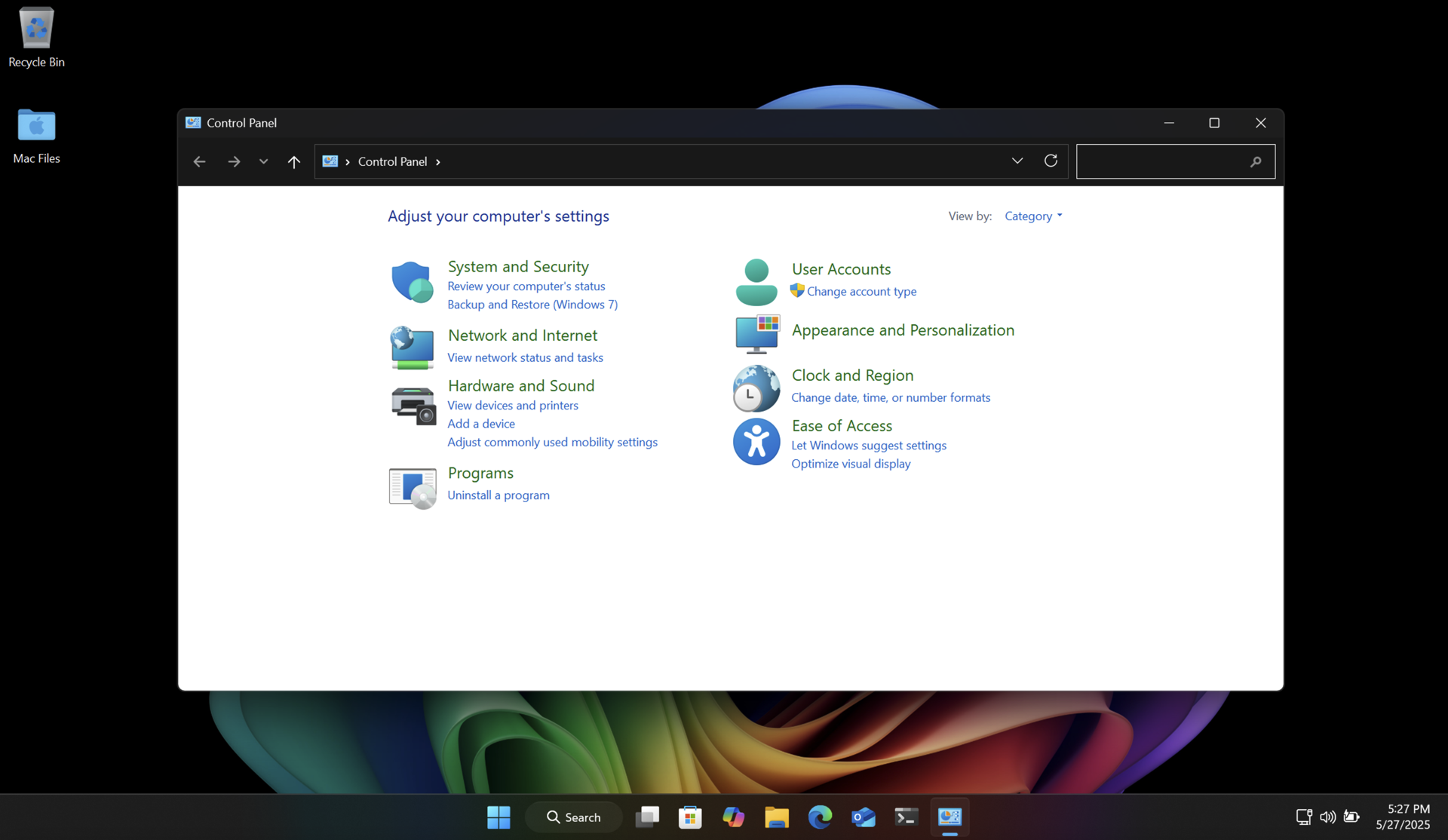

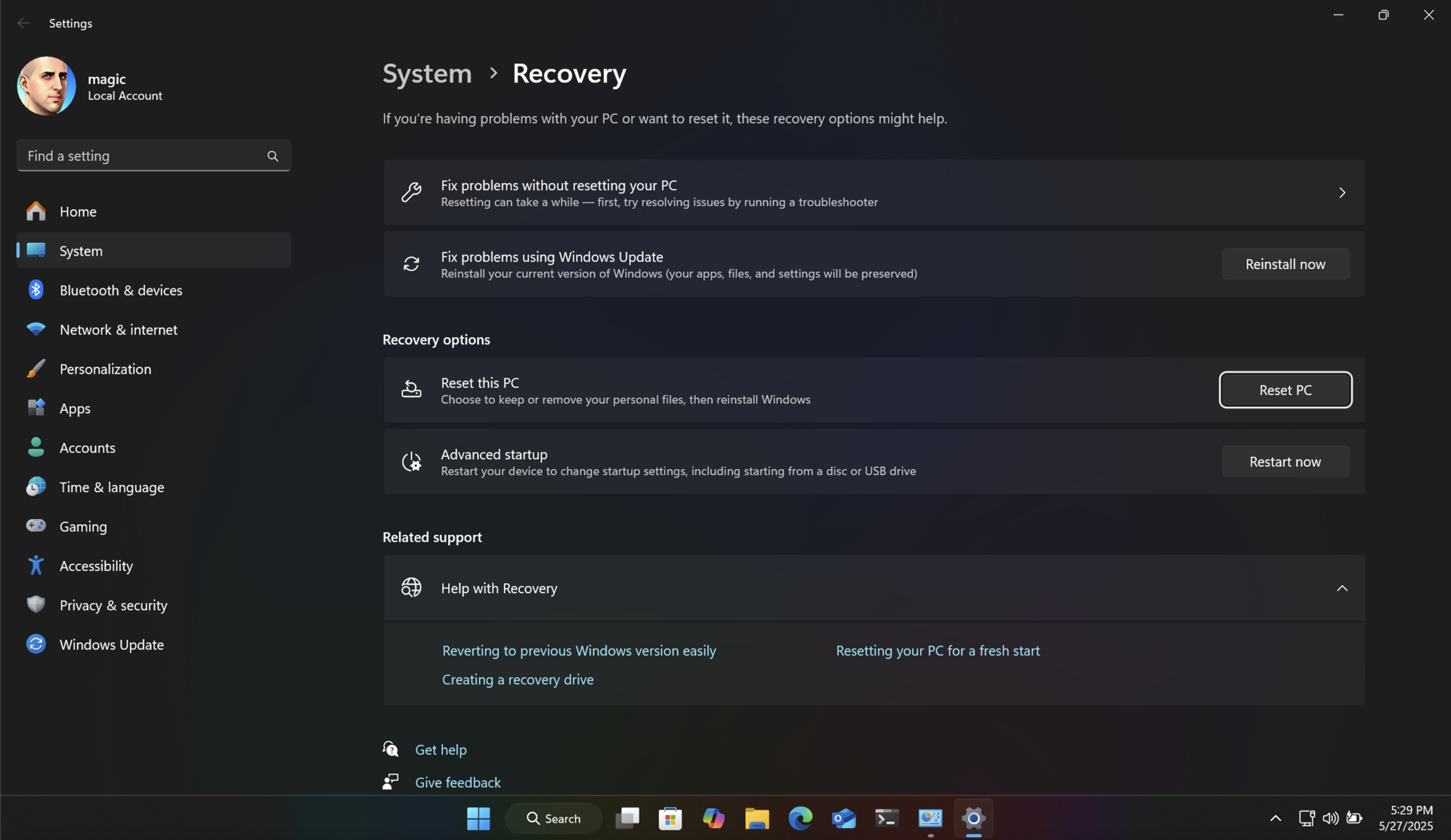
Both of these methods will return your SSD to like-new performance, and ensure longer data retention.
Unlike with Windows, there are no great utilities like SpinRite for modern Apple Silicon Macs. But fear not! There is a way to refresh SSD cells using the built-in Time Machine feature. And it's pretty easy to use. You will be backing up your Mac, then erasing it, reinstalling macOS, and then restoring the backup.
Connect an external storage device to your Mac and configure it in Time Machine as your backup device. Then run a backup.
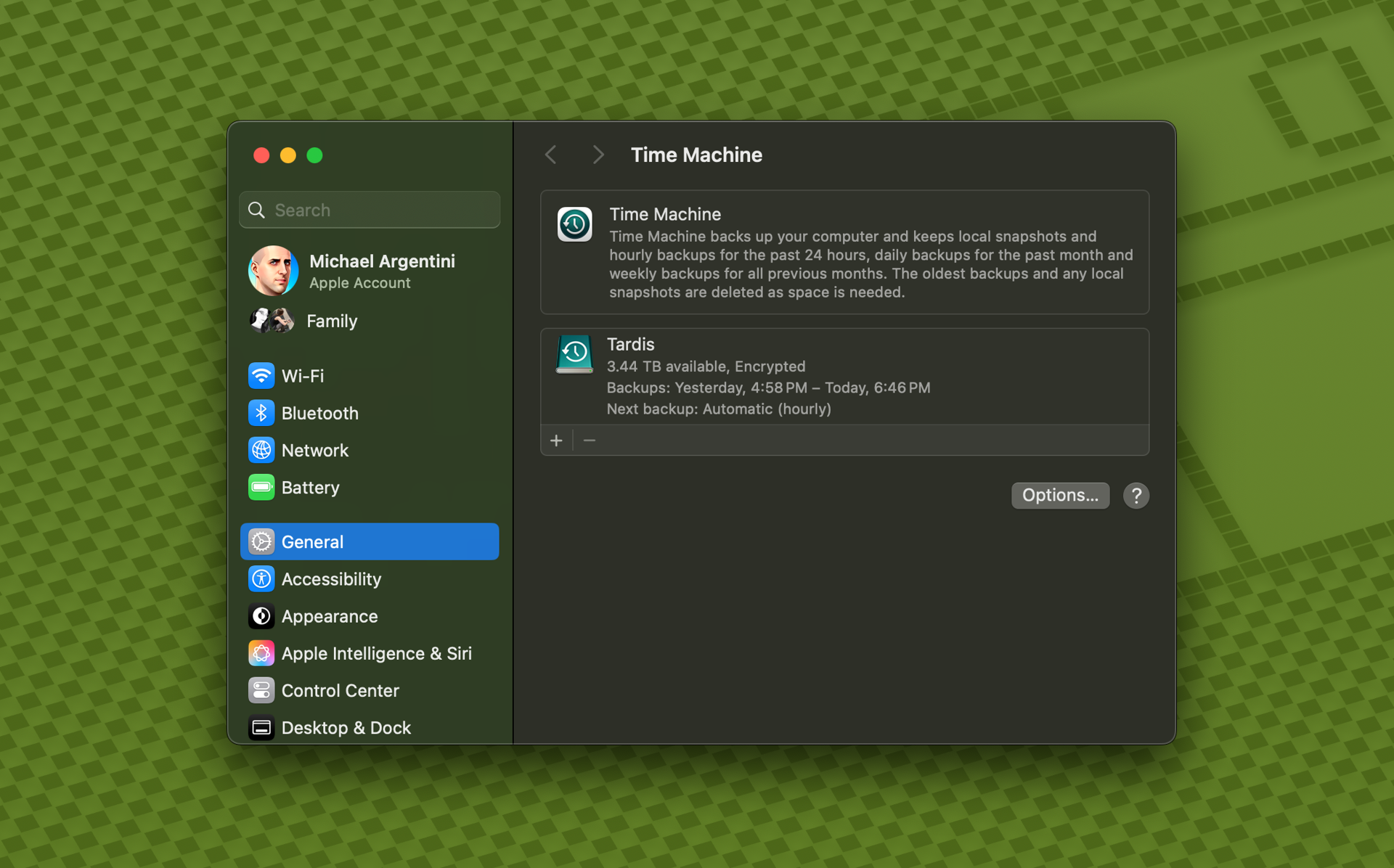
Note: some applications, like Docker, do not allow Time Machine to back up their data by default. In the case of Docker there is an option to enable this.
Once you have a complete backup, restart your Mac into recovery mode. On modern Apple Silicon Macs you just shut down the computer. Then turn it back on by pressing the power button until the Mac tells you it is loading startup options.
Use Disk Utility to erase the SSD, and then choose to reinstall macOS.
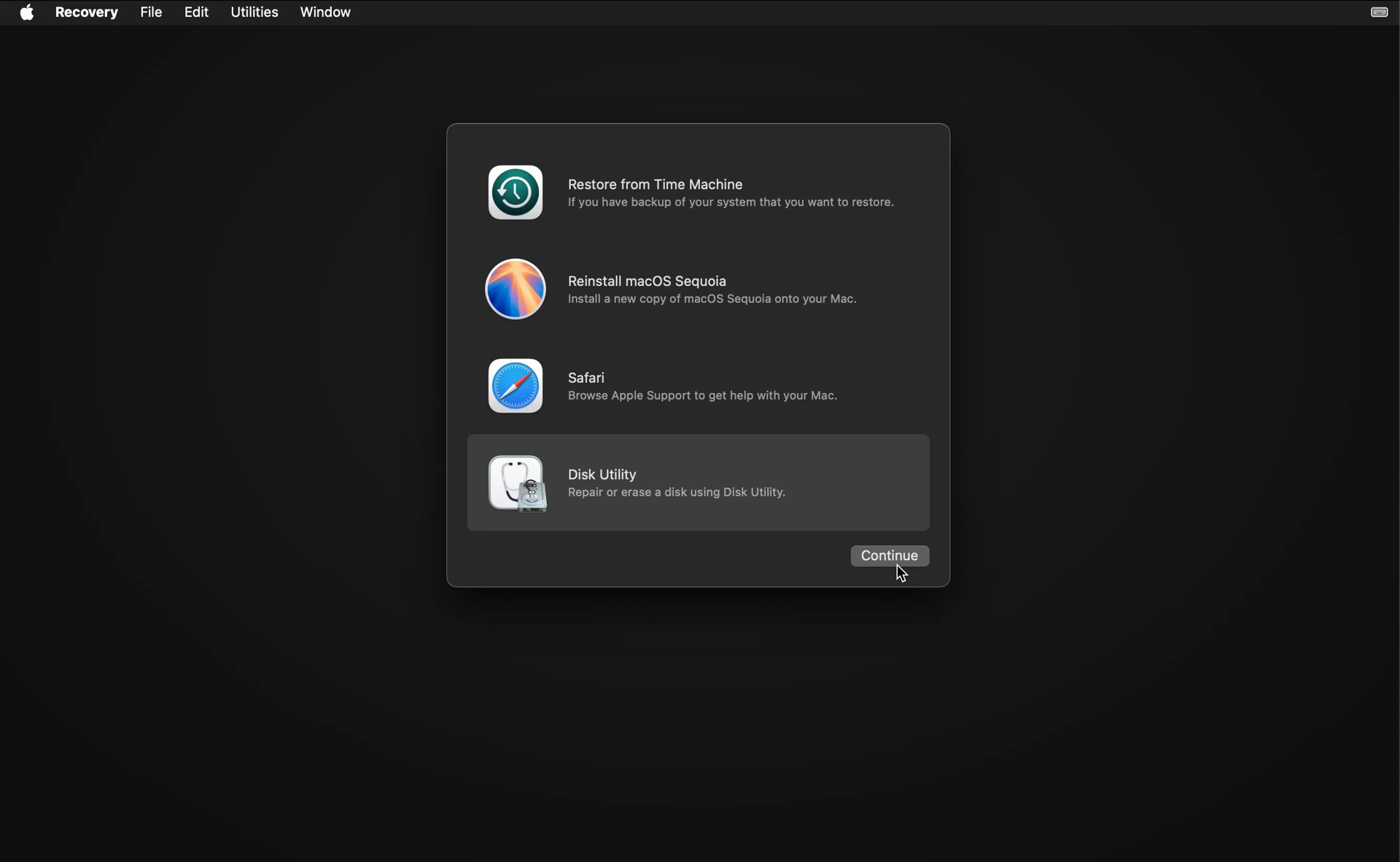
After the OS is installed it will restart and run Migration Assistant.

Choose to transfer files from Time Machine, and follow the instructions. It will show you all Time Machine backups for connected drives. Choose the latest backup entry for your backup drive, and let Migration Assistant do its thing. You will be left with a refreshed SSD with all your files intact.
The research in this area is nascent, so the optimal frequency for refreshing your SSD cells really depends on how well it is performing, how many writes have been made, and how full it is on average. On my server data drive I rarely write new files. But the data is very important. So I'm planning on refreshing the cells yearly just to be safe.
So how often should you run this process? If your SSD is new or averages under 50% usage, and is under 10 years old, I would do this yearly through that period. As your SSD ages (or if you have a mostly full SSD) it may be better to run it more frequently.
There's usually more to the story so if you have questions or comments about this post let us know!
Do you need a new software development partner for an upcoming project? We would love to work with you! From websites and mobile apps to cloud services and custom software, we can help!
SqlPkg is a 64-bit .NET command line (CLI) wrapper for the Microsoft SqlPackage CLI tool with the goal of making common backup and restore operations easier and more powerful. It does this through new Backup and Restore actions that provide additional features like the exclusion of specific table data in backups and destination prep prior to restore.
Visit the repository to see how you can install this tool to begin using it right away.
/Action:backup
This mode is equivalent to Action:Export to create a .bacpac file, with the following differences.
/Action:restore
This mode is equivalent to Action:Import to restore a .bacpac file, with the following differences.
/Action:backup-all
This mode will back up all user databases on a server.
/Action:restore-all
This mode will restore all *.bacpac files in a given path to databases with the same names as the filenames.
When not using SqlPkg special action modes, the entire argument list is simply piped to SqlPackage and will run normally. So you can use sqlpkg everywhere SqlPackage is used.
1. Install Microsoft .NET
SqlPkg requires that you already have the .NET 8.0 runtime installed, which you can get at https://dotnet.microsoft.com/en-us/download.
Because SqlPkg uses Microsoft SqlPackage, you will also need to install the .NET 6.0 runtime as well as SqlPackage.
2. Install SqlPkg
Run the following command in your command line interface (e.g. cmd, PowerShell, Terminal, bash, etc.):
Later you can update SqlPkg with the following command:
If you need to completely uninstall SqlPkg, use the command below:
There's usually more to the story so if you have questions or comments about this post let us know!
Do you need a new software development partner for an upcoming project? We would love to work with you! From websites and mobile apps to cloud services and custom software, we can help!
The DataStore project is a high performance JSON object store (ORM) for SQL Server.
DataStore uses and automatically creates and manages a pre-defined SQL Server data structure that can coexist with existing database objects. All database operations are performed with the DataStore helper class.
Your models are stored in the database as JSON text so you can have most any kind of object structure, provided your models inherit from DsObject.
Instantiating DataStore with settings is non-destructive. Any existing DataStore tables are left untouched. Methods to delete all or unused schema objects are provided for those edge cases.
Instantiate DataStore with a settings object and database schema will be created for all classes that inherit from DsObject. The following attributes can be used in your classes:
You can create a DataStore instance anywhere in your code:
You can also use DataStore as a singleton service:
Creating and saving a DataStore object is simple:
The saved object is updated with any changes, like lineage and depth information, creation or last update date, etc. And you can provide a list of objects to save them all in one call.
Querying the database for objects is simple too. In any read calls you can specify a DsQuery object with a fluent-style pattern for building your query. In the query you can specify property names as strings with dot notation:
Or you can use the model structure to specify names, and make code refactoring easier:
If you need to access object properties without knowing the object type, DsObject exposes JSON features that allow you to access property values using standard JSON path syntax:
Remember: these JSON features are read-only. If you change a property value in the DsObject you will need to call Serialize() again to update the JSON representation.
There's usually more to the story so if you have questions or comments about this post let us know!
Do you need a new software development partner for an upcoming project? We would love to work with you! From websites and mobile apps to cloud services and custom software, we can help!
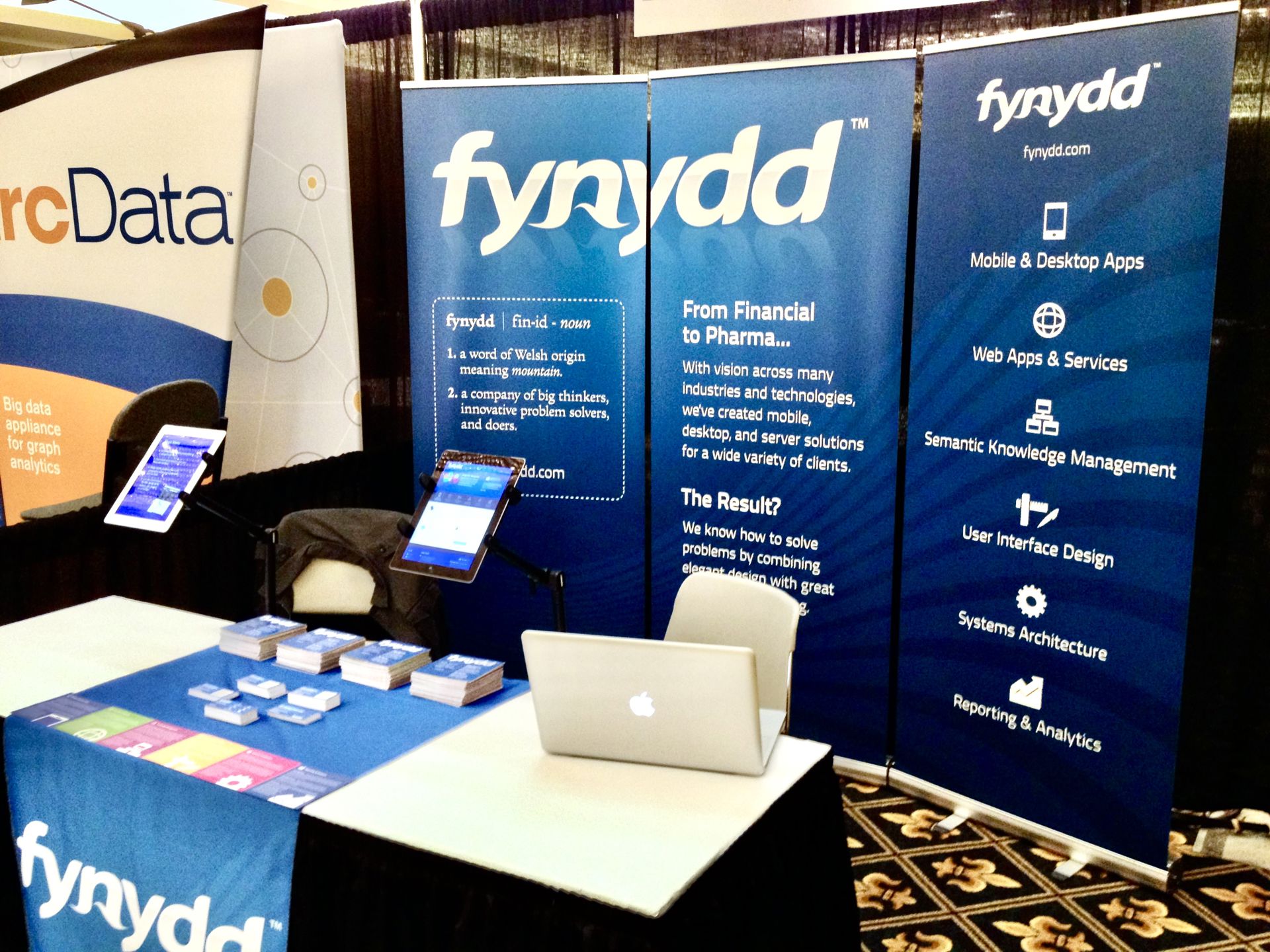
We'll be presenting the following topic at the 2012 UK Semantic Tech & Business (SemTech) Conference:
Building a Semantic Enterprise Content Management System from Scratch
2012 UK Semantic Tech & Business Conference
Millennium Gloucester Hotel, London, England
Thursday, September 20, 3:45-4:15 PM
Detail on our program is available on the SemTechBiz UK 2012 site. The conference runs September 19-20. We hope to see you there!
There's usually more to the story so if you have questions or comments about this post let us know!
Do you need a new software development partner for an upcoming project? We would love to work with you! From websites and mobile apps to cloud services and custom software, we can help!
In early June, Fynydd was invited to speak at the 2012 Semantic Tech & Business Conference in San Francisco, California. By all accounts, Fynydd’s message was unique, informative, and overall very well received by conference attendees.
The topic “How To Build a Sematic Content Management System From Scratch” garnered much interest even before the conference began. During our presentation, we outlined a case study based on a recent Fynydd client engagement. We walked through the successes and challenges Fynydd faced in designing and implementing a semantic prototype system for a large financial institution.
Though primarily invited as a speaker, Fynydd also secured a location on the exhibit floor of the conference so that we could present our full breadth of services to conference attendees. Activity at the exhibit was bustling. Attendees remarked about Fynydd's unique set of service offerings, as well as how we worked with other exhibitor products to build holistic solutions for our clients. Conversations focused heavily on user interface design and overall user experience as well as implementation of semantic technologies across a wide variety of industries and projects.
With the success of this conference, Fynydd was asked to present at the SemTechBiz satellite conference in London later this year. You can find out more by visiting the Fynydd SemTech page and the SemTechBiz London site.
There's usually more to the story so if you have questions or comments about this post let us know!
Do you need a new software development partner for an upcoming project? We would love to work with you! From websites and mobile apps to cloud services and custom software, we can help!