

Software developers using Apple Silicon Macs who work with Microsoft SQL Server have been wrestling with how to build on their local computers for some time. The problem is that SQL Server only supports x64 processors, even in the latest editions. And that's just the start.
In the past, when Macs used Intel x64 chips, developers could run a SQL Server instance in several ways:
Use an x64 Windows machine on their local network (yuck)
Run a Docker container with the free version of Azure SQL Edge
Run SQL Server on an x64 Windows virtual machine using Parallels Desktop
Boot into x64 Windows using Boot Camp, and just work in Windows
When Apple Silicon was released, things got complicated. We were left with these options:
Use an x64 Windows machine on their local network (yuck)
Run a Docker container with the free version of Azure SQL Edge; uses Rosetta 2 to emulate x64
SQL Server would not run in a Parallels virtual machine because only Arm64 Windows 11 was supported, and no SQL Server editions would run through the Windows Prism emulation.
Boot Camp no longer exists
Apple recently added another wrinkle by deprecating Rosetta 2 in 2028. And Microsoft added a wrinkle by deprecating Azure SQL Edge in 2025. So we are left with one option:
Use an x64 Windows machine on their local network (yuck)
We now have a viable solution. It's not the perfect option. A perfect option would be a containerized version of SQL Server that was Arm64 native. But we do have the next best thing...
When Microsoft recently released SQL Server 2025, one of the things they added was support for running it on Arm-based Windows 11 using the Prism emulation layer. This meant that, although not officially supported, we could use an Arm-based Windows 11 virtual machine (using Parallels Desktop) to host the latest version of SQL Server, even Enterprise Edition!
There is an issue with the installation that causes SQL Server to only bind to a named pipe. This allows you to use it on the virtual machine using SSMS but nowhere else. But after much trial and error I discovered that TCP binding support is there, it's just not available in the SQL configuration tool where you would enable it. Some registry additions restore and enable the binding. Below is a simple PowerShell script that does this for you. Run this in an elevated PowerShell instance.
To make the server instance available to the host Mac, and devices on your local network, there are a couple additional steps.
First, set your Parallels virtual machine to use Shared Networking
Next, add 2 port forwards to the Shared networking model within the Parallels application preferences.
TCP port 1433 to 1433
UDP port 1434 to 1434
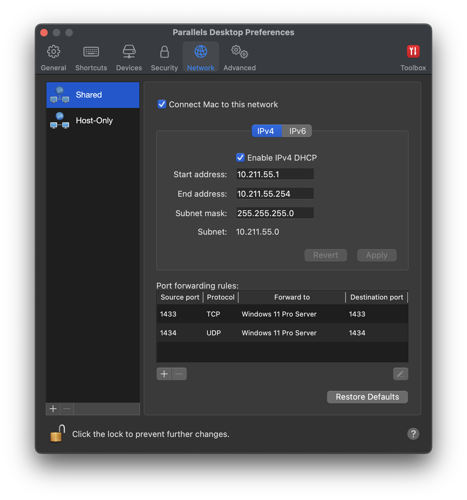
Lastly, open those two ports in the virtual machine Windows Firewall.
Once these remaining steps are complete you should be able to connect to the SQL Server instance from your host Mac, or over a network from any other device, using the host Mac's IP address. This method uses more memory than a container, but it's also better than a container because it's a native edition of SQL Server 2025 running on actual Windows. This means you get all the additional features, including the new AI and vector embeddings support, C# code compatibility, and more.
#YOUREWELCOME
There's usually more to the story so if you have questions or comments about this post let us know!
Do you need a new software development partner for an upcoming project? We would love to work with you! From websites and mobile apps to cloud services and custom software, we can help!